C++系列:第 5 篇,共 6 篇
C++ 标准库和语言特性的用法整理,以及进程间通信
printf 格式控制符
| 类型 | 含义 |
|---|
%d | 有符号十进制整数 |
%u | 无符号十进制整数 |
%x / %X | 十六进制整数(小写 / 大写) |
%o | 八进制整数 |
%f | 小数形式的浮点数,默认保留 6 位小数 |
%e | 科学计数法形式的浮点数 |
%g | 自动选择%f或%e中较短的形式 |
%c | 单个字符 |
%s | 字符串 |
%p | 指针地址 |
%% | 输出一个% |
| 标志 | 含义 |
|---|
- | 左对齐,默认为右对齐 |
+ | 正数也显示符号 |
0 | 宽度不足时用0填充,默认用空格填充 |
# | 八进制加前缀0,十六进制加前缀0x |
| 空格 | 正数前留一个空格 |
| 长度 | 对应类型 |
|---|
%hhd | signed char |
%hd | short |
%ld | long |
%lld | long long |
%zu | size_t |
%Lf | long double |
宽度和精度可以写成*,由参数给出
1
2
3
4
5
6
7
8
9
10
11
12
13
14
15
16
17
| #include <cstdio>
int main()
{
printf("[%5d]\n", 42); // [ 42]
printf("[%-5d]\n", 42); // [42 ]
printf("[%05d]\n", 42); // [00042]
printf("[%+d]\n", 42); // [+42]
printf("[%.2f]\n", 3.14159); // [3.14]
printf("[%8.3f]\n", 3.14159); // [ 3.142]
printf("[%#x]\n", 255); // [0xff]
printf("[%e]\n", 12345.678); // [1.234568e+04]
printf("[%.3s]\n", "abcdef"); // [abc]
printf("[%*d]\n", 5, 42); // [ 42]
return 0;
}
|
C++ 格式化输出
流操纵符
std::cout通过<iomanip>中的操纵符控制格式。除std::setw只对下一次输出生效外,其余设置会一直保持到被修改
1
2
3
4
5
6
7
8
9
10
11
12
| #include <iomanip>
#include <iostream>
int main()
{
std::cout << std::setw(8) << 42 << std::endl; // " 42"
std::cout << std::setfill('0') << std::setw(5) << 42 << std::endl; // "00042"
std::cout << std::fixed << std::setprecision(2) << 3.14159 << std::endl; // "3.14"
std::cout << std::hex << std::showbase << 255 << std::endl; // "0xff"
return 0;
}
|
C++20 在<format>中提供了std::format,用{}作为占位符,返回格式化后的std::string,参数类型在编译期检查(需要 GCC 13 或更高版本,编译时加上-std=c++20)
1
| {[参数序号]:[填充][对齐][符号][#][0][宽度][.精度][类型]}
|
对齐方式有<左对齐、>右对齐、^居中
1
2
3
4
5
6
7
8
9
10
11
12
13
14
15
| #include <format>
#include <iostream>
int main()
{
std::cout << std::format("{} + {} = {}", 1, 2, 3) << std::endl; // 1 + 2 = 3
std::cout << std::format("{1} {0} {1}", "a", "b") << std::endl; // b a b
std::cout << std::format("[{:>8.2f}]", 3.14159) << std::endl; // [ 3.14]
std::cout << std::format("[{:<8}]", "left") << std::endl; // [left ]
std::cout << std::format("[{:*^8}]", "mid") << std::endl; // [**mid***]
std::cout << std::format("[{:05d}]", 42) << std::endl; // [00042]
std::cout << std::format("[{:#x}]", 255) << std::endl; // [0xff]
return 0;
}
|
C++23 在<print>中提供了std::print和std::println,格式与std::format相同,直接输出到标准输出(需要 GCC 14 或更高版本,编译时加上-std=c++23)
1
2
3
4
5
6
7
8
| #include <print>
int main()
{
std::println("{} + {} = {}", 1, 2, 3);
return 0;
}
|
Python 格式化输出
f-string 在字符串前加f,{}中可以直接写表达式,冒号后面的格式说明与std::format基本一致
1
2
3
4
5
6
7
8
9
10
11
12
| value = 3.14159
count = 42
name = "left"
print(f"[{value:>8.2f}]") # [ 3.14]
print(f"[{name:<8}]") # [left ]
print(f"[{name:*^8}]") # [**left**]
print(f"[{count:05d}]") # [00042]
print(f"[{255:#x}]") # [0xff]
print(f"[{1234567:,}]") # [1,234,567]
print(f"[{0.256:.1%}]") # [25.6%]
print(f"{count=}") # count=42
|
print()通过sep指定多个参数之间的分隔符,end指定结尾字符,flush=True立即刷新缓冲区
1
2
| print("a", "b", "c", sep=", ") # a, b, c
print("loading...", end="", flush=True) # 不换行并立即显示
|
彩色输出
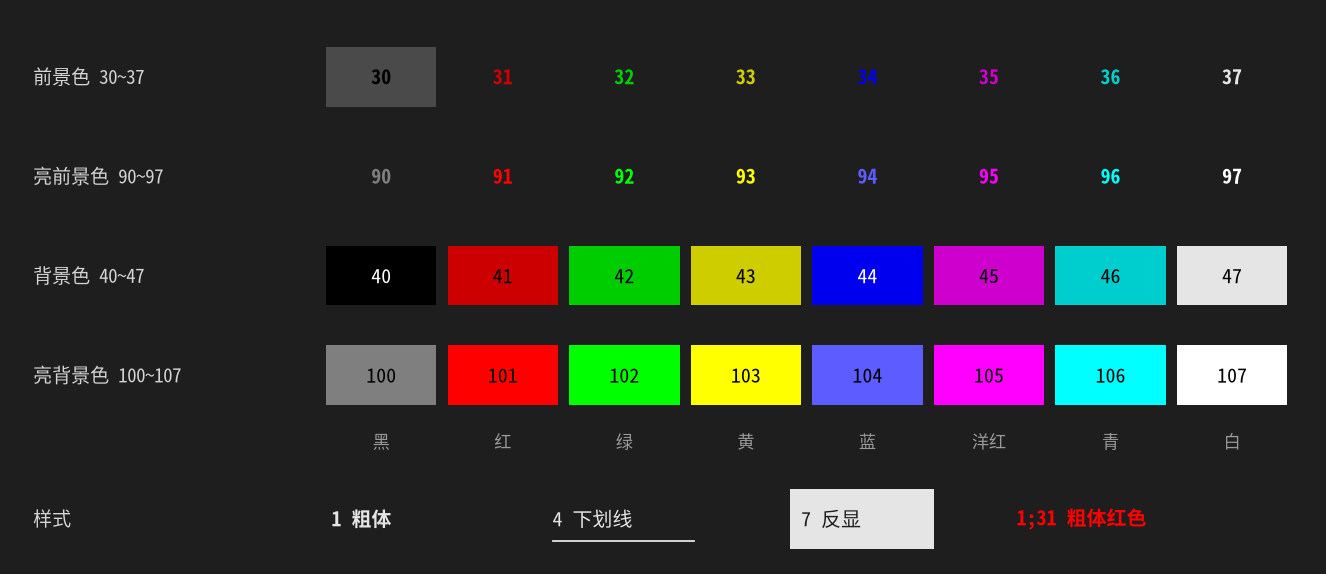
终端通过 ANSI 转义序列控制颜色和光标,转义序列以\033[开头。以下内容与语言无关,printf、std::cout、print()都可以使用
| 转义字符 | 功能 |
|---|
\033[0m | 重置所有属性 |
\033[30m | 黑色文本 |
\033[31m | 红色文本 |
\033[32m | 绿色文本 |
\033[33m | 黄色文本 |
\033[34m | 蓝色文本 |
\033[35m | 洋红色文本 |
\033[36m | 青色文本 |
\033[37m | 白色文本 |
\033[90m ~ \033[97m | 对应的亮色文本 |
\033[38;5;${n}m | 256 色文本,n为 0~255 |
\033[38;2;${red};${green};${blue}m | 自定义 RGB 文本 |
1
| printf("\033[31mred text\033[0m\n");
|
| 转义字符 | 功能 |
|---|
\033[40m | 黑色背景 |
\033[41m | 红色背景 |
\033[42m | 绿色背景 |
\033[43m | 黄色背景 |
\033[44m | 蓝色背景 |
\033[45m | 洋红色背景 |
\033[46m | 青色背景 |
\033[47m | 白色背景 |
\033[100m ~ \033[107m | 对应的亮色背景 |
\033[48;5;${n}m | 256 色背景,n为 0~255 |
\033[48;2;${red};${green};${blue}m | 自定义 RGB 背景 |
1
| printf("\033[41mred backdrop\033[0m\n");
|
| 转义字符 | 功能 |
|---|
\033[1m | 粗体 |
\033[4m | 下划线 |
\033[5m | 闪烁 |
\033[7m | 反显 |
\033[8m | 消隐 |
多个属性可以用分号合并,如\033[1;31;47m表示白底红色粗体
实际颜色由终端的配色方案决定,不同终端会有差异
1
| print("\033[1;31mbold red text\033[0m")
|
输出被重定向到文件或管道时,转义序列会原样写入。需要兼顾两种情况的程序,应先判断输出是否为终端(C/C++ 使用isatty(),Python 使用sys.stdout.isatty())
光标
| 转义字符 | 功能 |
|---|
\033[${n}A | 光标上移 n 行 |
\033[${n}B | 光标下移 n 行 |
\033[${n}C | 光标右移 n 列 |
\033[${n}D | 光标左移 n 列 |
\033[H | 光标移动到左上角 |
\033[${y};${x}H | 设置光标位置 |
\033[2J | 清除屏幕 |
\033c | 清除屏幕并重置所有终端设置 |
\033[K | 清除从光标到行尾的内容 |
\033[s | 保存光标位置 |
\033[u | 恢复光标位置 |
\033[?25l | 隐藏光标 |
\033[?25h | 显示光标 |
\r回到行首配合\033[K清除行尾,可以在同一行内刷新进度
1
2
3
4
5
6
| import time
for i in range(101):
print(f"\r\033[Kprogress: {i}%", end="", flush=True)
time.sleep(0.02)
print()
|