基本配置
1
2
3
4
| git config --global user.name "name"
git config --global user.email "email@example.com"
git config --global init.defaultBranch main
git config --global pull.rebase true
|
pull.rebase设为true后,git pull会把本地提交变基到远程提交之后,避免产生多余的合并提交
1
| git config --global --list
|
日常提交
1
2
| git add <文件>
git add -p
|
1
2
| git commit -m "提交说明"
git push
|
1
| git log --oneline --graph --all
|
忽略文件
不需要纳入版本管理的文件(编译产物、依赖目录、IDE 配置、密钥等)写入仓库根目录的.gitignore
1
2
3
4
5
6
7
8
9
10
11
| # 忽略所有 .log 文件
*.log
# 忽略任意位置的 build 目录
build/
# 只忽略根目录下的 config.json
/config.json
# 不忽略 important.log
!important.log
|
.gitignore只对尚未被跟踪的文件生效。文件已经提交过时,需要先从版本库中移除(保留本地文件)
1
2
| git rm --cached <文件>
git rm -r --cached <目录>
|
1
| git check-ignore -v <文件>
|
分支操作
1
2
| git switch main
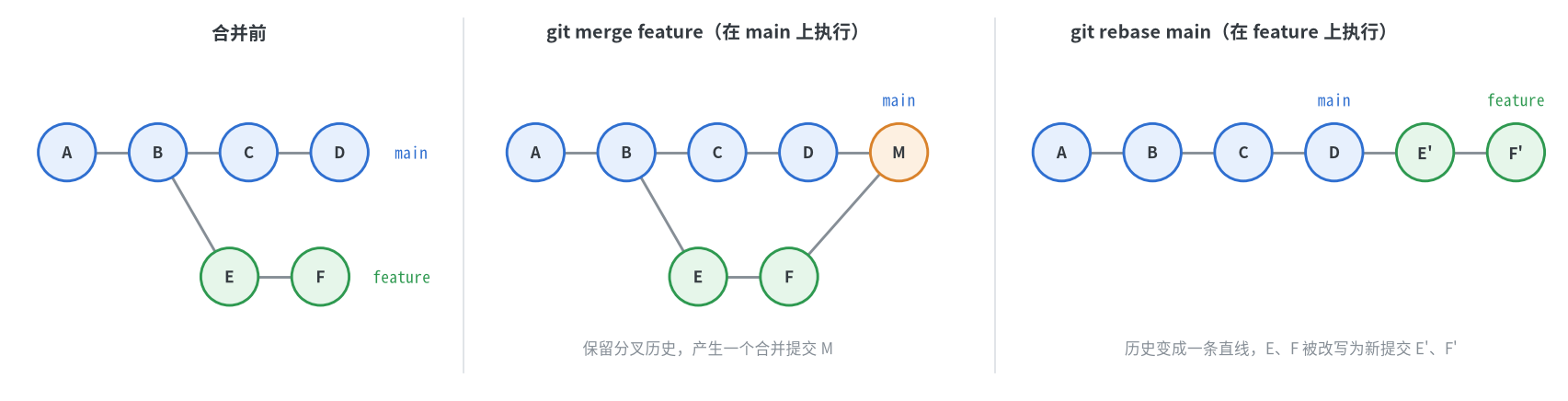
git merge feature
|
1
2
| git switch feature
git rebase main
|
变基会改写提交历史,只应对尚未推送或仅自己使用的分支进行
1
| git push -u origin feature
|
1
2
| git branch -d feature
git push origin --delete feature
|
挑选提交
遇到冲突时,解决冲突并git add后执行git cherry-pick --continue,放弃则执行git cherry-pick --abort
标签
标签用于标记某个提交,通常用来标记发布版本
1
2
| git tag v1.0.0
git tag -a v1.0.0 -m "版本说明"
|
1
2
| git tag
git show v1.0.0
|
1
2
| git push origin v1.0.0
git push origin --tags
|
git push默认不会推送标签,需要单独推送
1
2
| git tag -d v1.0.0
git push origin --delete v1.0.0
|
撤销修改
1
| git restore --staged <文件>
|
1
| git reset --soft HEAD~1
|
1
| git reset --hard HEAD~1
|
--amend、reset会改写历史,已经推送到公共分支的提交应使用revert撤销。误操作后可以用git reflog找回被reset掉的提交
暂存现场
1
2
3
| git stash
git stash list
git stash pop
|
同步上游仓库
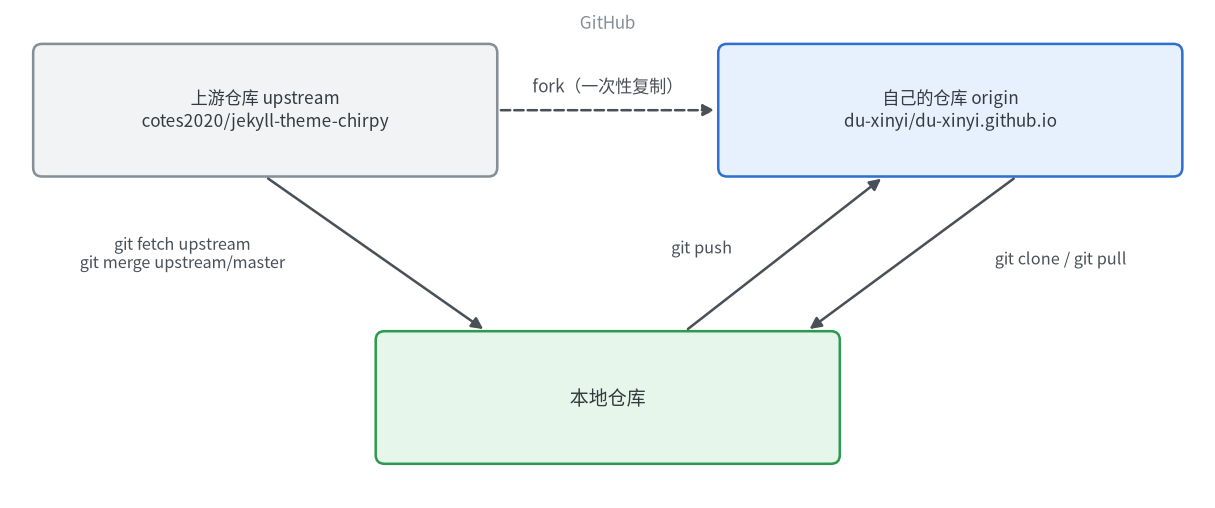
fork 是在自己账号下复制出的一个独立仓库,不会自动跟随源仓库更新。以本博客为例,源仓库(上游)为jekyll-theme-chirpy,fork 得到的仓库为du-xinyi.github.io
1
| git clone https://github.com/du-xinyi/du-xinyi.github.io.git
|
此时远程仓库只有origin,指向自己的仓库。把源仓库添加为另一个远程仓库,习惯上命名为upstream
1
2
| git remote add upstream https://github.com/cotes2020/jekyll-theme-chirpy.git
git remote -v
|
1
2
3
4
| origin https://github.com/du-xinyi/du-xinyi.github.io.git (fetch)
origin https://github.com/du-xinyi/du-xinyi.github.io.git (push)
upstream https://github.com/cotes2020/jekyll-theme-chirpy.git (fetch)
upstream https://github.com/cotes2020/jekyll-theme-chirpy.git (push)
|
1
2
| git fetch upstream
git merge upstream/master
|
有冲突时,手动修改冲突文件后执行git add和git commit完成合并,最后git push推送到自己的仓库
子模块
仓库通过submodule引用了其他仓库时,直接克隆得到的子模块目录是空的,需要在克隆时一并拉取
1
| git clone --recurse-submodules <仓库地址>
|
1
| git submodule update --init --recursive
|
1
| git submodule update --remote
|